
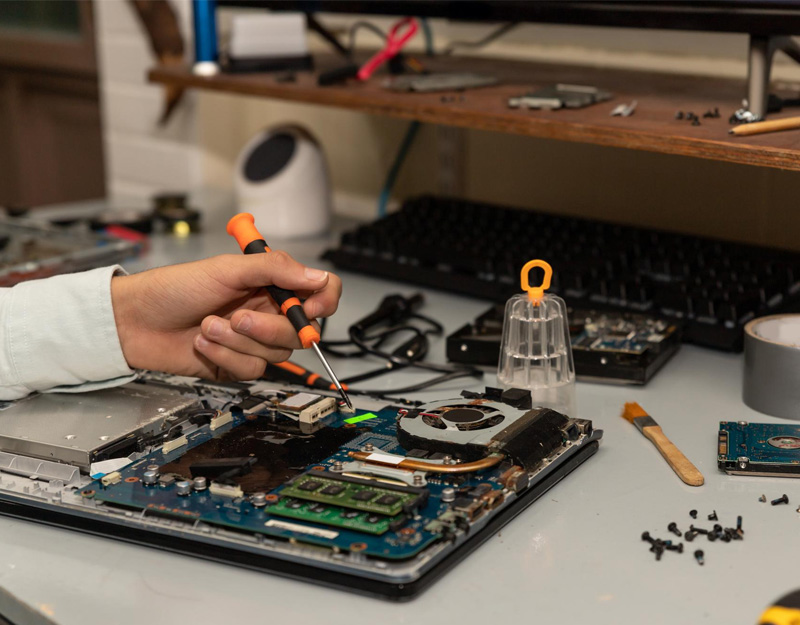
In today’s tech-driven world, we use smartphones and computers daily—they’ve become an inseparable part of our lives. Yet, only a few truly understand what’s inside these devices and how their internal components work together to deliver such an incredible digital experience.
In this article, we’ll open a window into the heart of your phone or computer, taking a close look at the hardware that makes all this digital magic possible.
First: What is Hardware?
Hardware refers to all the tangible, physical parts of a device—everything you can touch and see—unlike software, which refers to programs, apps, and operating systems.
In short, hardware is the mechanical and electronic structure that hosts and executes software commands.
Main Components of a Computer
1. Central Processing Unit (CPU) – The Brain of the Device
The CPU is the central processing unit, often called the brain of the computer.
-
Function: Processes commands and executes instructions from software.
-
Types:
-
Intel: Such as Core i5, i7, and i9.
-
AMD: Such as Ryzen series.
-
-
Performance indicators: Speed (measured in GHz) and the number of cores, which allow multiple tasks to be executed simultaneously.
2. Motherboard – The Backbone
The motherboard is the main circuit board connecting all other components.
-
Function: Provides communication pathways between all components (CPU, memory, storage, graphics card, etc.).
-
Includes slots and ports for connecting different parts.
-
Also controls power distribution from the power supply to each component.
3. Random Access Memory (RAM) – The Temporary Workspace
-
Function: Temporarily stores data while programs are running, allowing the CPU to access them quickly.
-
More RAM allows the device to run more programs at once.
-
On desktops and laptops, RAM can range from 4GB to 64GB or more.
4. Storage – The Data Library
This is where all files, programs, and the operating system are stored.
-
Types of storage:
-
HDD (Hard Disk Drive): Cheaper and larger capacity, but slower.
-
SSD (Solid-State Drive): Faster and smaller, but more expensive.
-
NVMe SSD: The latest, fastest storage option.
-
-
In smartphones, storage is typically eMMC or UFS.
5. Graphics Processing Unit (GPU) – The Visual Artist
-
Function: Processes images, videos, and 3D graphics.
-
Two types:
-
Integrated: Built into the CPU, like Intel UHD or AMD Radeon Vega.
-
Dedicated: Separate cards like NVIDIA GeForce or AMD Radeon for heavy graphics tasks.
-
6. Power Supply Unit (PSU) – The Heartbeat
-
Converts electrical current from the source into suitable power for each component.
-
In desktops, it’s a separate unit; in laptops and smartphones, it’s integrated with the battery.
7. Cooling Systems – The Thermal Guard
-
Types:
-
Air cooling with fans.
-
Liquid cooling for high-performance devices.
-
-
Purpose: Keep components within safe temperature ranges.
Internal Components of a Smartphone
Smartphones have similar parts to computers, but in a smaller, integrated design.
1. Processor (SoC – System on Chip)
-
Contains the CPU, GPU, AI processor, and sometimes the network modem.
-
Leading brands: Qualcomm (Snapdragon), Apple (A-Series), MediaTek, Samsung (Exynos).
2. Memory (RAM + Storage)
-
RAM usually ranges between 4GB and 16GB.
-
Internal storage ranges from 64GB to 1TB in flagship devices.
3. Display
-
Types:
-
LCD (IPS LCD)
-
OLED / AMOLED
-
-
Resolution and color quality determine the visual experience.
4. Battery
-
Uses Li-Ion or Li-Po technology, with capacities between 3000 and 6000 mAh.
-
Fast charging and wireless charging are now common.
5. Cameras
-
Include sensors and multiple lenses for photo and video capture.
-
Built-in image processors enhance quality in real-time.
6. Sensors
-
Examples: fingerprint sensor, ambient light sensor, proximity sensor, gyroscope, digital compass.
-
These enable richer user interactions and application features.
How Do These Components Work Together?
When you power on your device:
-
The power supply sends electricity to the motherboard and components.
-
The CPU executes the operating system commands.
-
Programs load data from storage into RAM.
-
The GPU outputs visuals to the screen.
-
Cooling systems maintain safe temperatures.
In smartphones, the process is similar, but all components are integrated into a single chip for space and power efficiency.
Rapid Advancements in Hardware
-
CPUs: Smaller and more efficient thanks to 5nm and soon 3nm manufacturing processes.
-
Storage: SSDs are tens of times faster than traditional HDDs.
-
Displays: Evolved from HD to 4K and even 8K, with HDR and 120Hz refresh rates.
-
Batteries: Faster charging and new technologies like reverse charging.
Can You Upgrade Hardware?
-
Desktops: Yes, you can change CPUs, add RAM, upgrade storage, or replace the GPU.
-
Laptops: Some components like RAM and storage can be upgraded.
-
Smartphones: Very difficult due to integrated design—usually only the battery can be replaced in certain models.
Tips for Maintaining Hardware
-
Prevent overheating with good ventilation or cooling pads.
-
Clean the device regularly from dust.
-
Use original power adapters to avoid damage.
-
Keep systems and software updated for compatibility and security.
-
For smartphones, use protective cases and screen protectors.
Conclusion
Hardware is the physical foundation behind everything we see and interact with in the tech world. Understanding what’s inside your phone or computer gives you deeper insight into how it works and helps you make better decisions when buying or maintaining your device.
With continuous technological progress, these components will become smaller, faster, and more efficient, paving the way for limitless innovation.
