
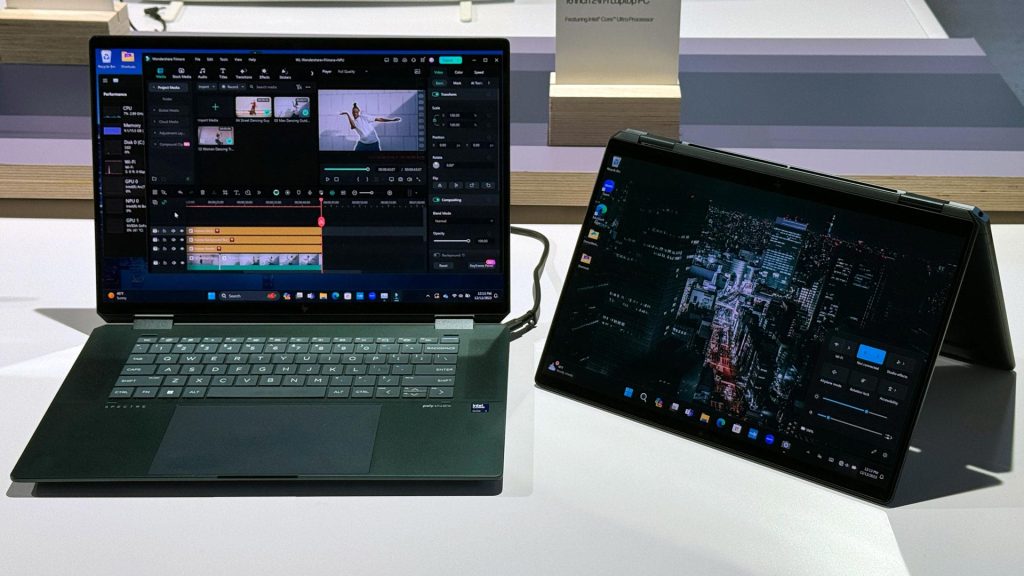
With rapid technological advancements, many devices have emerged to meet users’ ever-changing needs. Among these devices is the hybrid laptop, or the “2-in-1,” which can easily transform from a traditional laptop into a tablet. This unique design has sparked much debate: Is it truly a practical solution that combines the features of both devices or is it just a marketing gimmick designed to attract buyers? In this article, we will explore the different aspects of this device and evaluate whether it’s worth the investment.
What is a Hybrid Laptop? A hybrid laptop is a device that combines the functions of a traditional laptop and a tablet, where the screen can either be rotated 360 degrees or detached entirely to become a tablet. These devices rely on touchscreen displays and flexible designs. The most popular brands offering these devices include:
- Microsoft Surface
- Lenovo Yoga
- HP Spectre x360
Positive Aspects: Why Might You Buy a Hybrid Laptop?
- Flexibility of Use The key advantage of hybrid devices is versatility:
- They can be used as a laptop for work and then converted into a tablet for web browsing or drawing with a stylus.
- Perfect for students, professionals, and even artists.
- Ideal for presentations and meetings due to their interactive screens.
- Lightweight and Portable Design Hybrid devices are light and easy to carry while traveling.
- You no longer need to carry separate devices (laptop and tablet).
- High-Quality Touchscreens Most hybrid laptops come with high-resolution screens like Full HD or 4K.
- They support technologies such as HDR to enhance the viewing experience, making them great for watching movies or editing photos.
- Long Battery Life Hybrid laptops typically have long-lasting batteries thanks to power efficiency improvements, making them suitable for an entire workday.
- Ideal for Certain Industries
- In education, they make it easier for students to access eBooks and take notes.
- In business, they’re perfect for presentations and interactive meetings.
- Smart Stylus Support The smart stylus provides a unique experience for drawing, designing, and note-taking with precision.
Negative Aspects: Why Might You Hesitate?
- High-price hybrid laptops are often more expensive than traditional laptops or tablets, making them a costly investment.
- Average Performance They may not meet the needs of gamers or graphic designers, as they sometimes lack the power of a processor or graphics card suitable for heavy applications.
- Screen Hinge Durability The design of hybrid laptops relies on a strong hinge for folding or rotating. Over time, the hinge may wear out or get damaged.
- Comfort as a Laptop The keyboard may be smaller or less comfortable than traditional laptops, potentially affecting productivity, especially when typing for long periods.
- Limited Upgradability Hybrid devices are often limited in upgrade options (such as increasing RAM or changing the hard drive), restricting users who want to improve their device’s specifications in the future.
Is It a Marketing Gimmick? Many people ask: Do hybrid laptops truly offer real value or are companies exploiting their innovative design for marketing purposes at the expense of performance or quality?
The answer largely depends on the user’s needs. If you’re someone who needs a versatile device and benefits from the hybrid features (like drawing, handwriting, or multiple modes), then these devices are worth purchasing. However, if you’re looking for a powerful device for gaming or heavy work, traditional options may be better and more efficient.
Another factor to consider is the advancements companies have made in hybrid devices. Some models today come with powerful processors like Intel Core i7 or AMD Ryzen, making them capable of handling heavy tasks such as 3D design or video editing.
Who Should Get a Hybrid Laptop?
- Students
- Need a lightweight, portable device.
- Supports note-taking directly on the screen and easy viewing of lectures.
- Many universities today offer educational apps compatible with touchscreen devices, making hybrids a powerful learning tool.
- Creatives
- Artists or designers can use the touchscreen and stylus to create their work.
- Hybrid laptops support design apps like Adobe Photoshop and Procreate.
- Creatives benefit from the screen’s ability to fold or detach to work in comfortable positions while drawing or designing.
- Travelers
- Perfect for those who need a compact, lightweight device while traveling.
- Some hybrids come with a “low power” mode for longer battery life during long trips.
- Business Professionals
- Great for those involved in presentations or meetings, as the device can be transformed into a tablet for presenting slides or taking notes.
- Some devices come with fingerprint readers or facial recognition cameras, enhancing data security.
- Casual Users
- Ideal for browsing, light office work, and movie watching in one device.
- Suitable for simple hobbies like digital journaling or light gaming.
Technical Aspects to Consider When Buying a Hybrid Laptop
- Processor: Choose a device with a strong processor if you plan to use it for design or heavy tasks. Intel Core i5 or i7 and AMD Ryzen 5 or 7 are ideal choices.
- Screen Quality: Ensure you select a device with a high-quality display (Full HD or 4K) for an enjoyable viewing or drawing experience.
- Battery Capacity: Look for a device that offers long battery life, at least 8-10 hours of continuous use.
- Hinge Durability: Check the hinge’s sturdiness, especially if you plan to use the device frequently as a tablet.
- Stylus Support: If you need drawing or handwriting features, ensure the device supports a stylus smoothly and accurately.
Alternatives: Do You Really Need a Hybrid Device?
If you’re not convinced by the “one device for everything” idea, you may prefer to combine:
- Traditional Laptop: Provides higher performance for professionals, like designers or gamers.
- Separate Tablet: Light, perfect for entertainment, eBook reading, or handwriting.
- Ultrabooks: A middle ground between traditional laptops and hybrids, offering high performance and lightweight without tablet functionality.
Top Brands and Best Hybrid Devices on the Market
- Microsoft Surface Pro 9: One of the best hybrid devices today, with powerful performance, a high-quality PixelSense screen, and full stylus support.
- Lenovo Yoga 9i: Stylish and durable, with last-gen Intel processors and integrated high-quality speakers, making it great for entertainment.
- HP Spectre x360: Offers a premium experience with a 4K touchscreen and advanced security features like a fingerprint reader and IR camera.
- Dell XPS 13 2-in-1: Compact and lightweight, with long battery life and excellent touchscreen resolution.
Conclusion: Is a Hybrid Laptop Worth Purchasing?
The hybrid laptop is not just a “marketing gimmick” but a technological solution designed to meet specific needs. However, it might not be the ideal choice for everyone.
If you need a versatile, lightweight device, it’s a suitable choice. But if you prioritize powerful performance, traditional or specialized devices might be a better option.
Nevertheless, hybrid devices continue to evolve, making them worth considering for anyone looking for a device that combines productivity and entertainment in one design.
